Apple HomeView: Features, Specifications, Price, Availability, and Everything You Need to Know

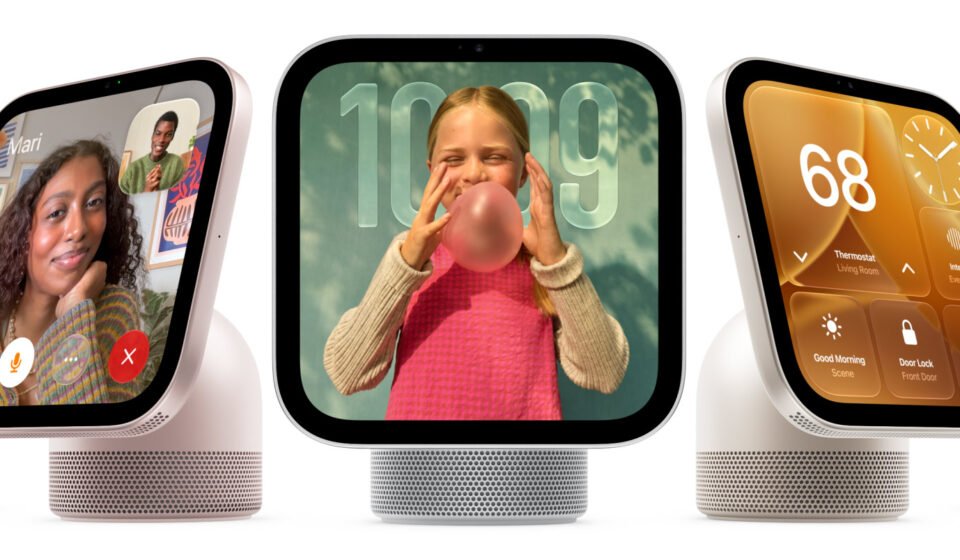
Apple is expanding its smart home ecosystem with Apple HomeView, a new smart display designed to bring home automation, entertainment, communication, and artificial intelligence into one convenient device. Officially introduced on October 13, 2026, HomeView combines a touchscreen interface with Siri AI, Apple Intelligence, FaceTime, music playback, and controls for compatible smart home accessories.
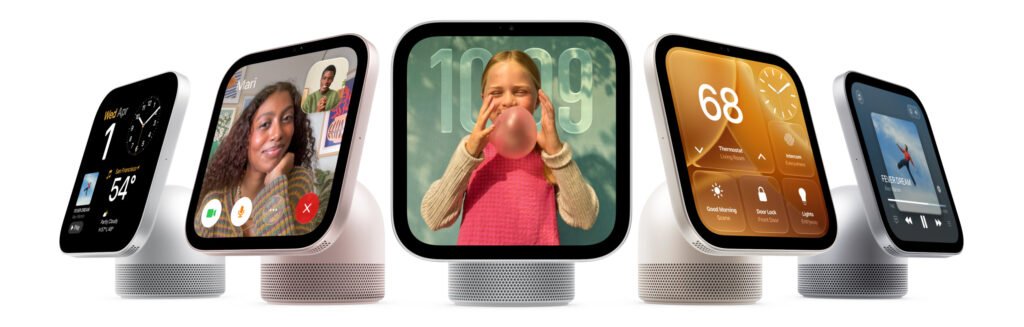
Unlike a conventional tablet, HomeView is designed to remain in a fixed location in the home, where family members can use it to manage lighting, check connected cameras, view calendar appointments, make video calls, and interact with Siri. Its square display, integrated speakers, front-facing camera, and adjustable stand make it suitable for kitchens, bedrooms, living rooms, and entryways.
Table of Contents
Apple HomeView is available in tabletop and wall-mounted configurations, allowing buyers to choose a setup that fits their home. With a starting price of $299 in the United States, it enters a market already served by smart displays from Amazon and Google, but differentiates itself through Apple’s software, ecosystem integration, and emphasis on privacy.
What Is Apple HomeView?
Apple HomeView is a dedicated smart home display that serves as a central interface for managing a connected home. It brings together features traditionally spread across smartphones, smart speakers, tablets, security displays, and home automation applications.
The device is designed around the Apple Home ecosystem. Users can interact with supported smart lights, thermostats, door locks, cameras, and other accessories from a single screen instead of opening the Home app on an iPhone every time they want to make an adjustment.
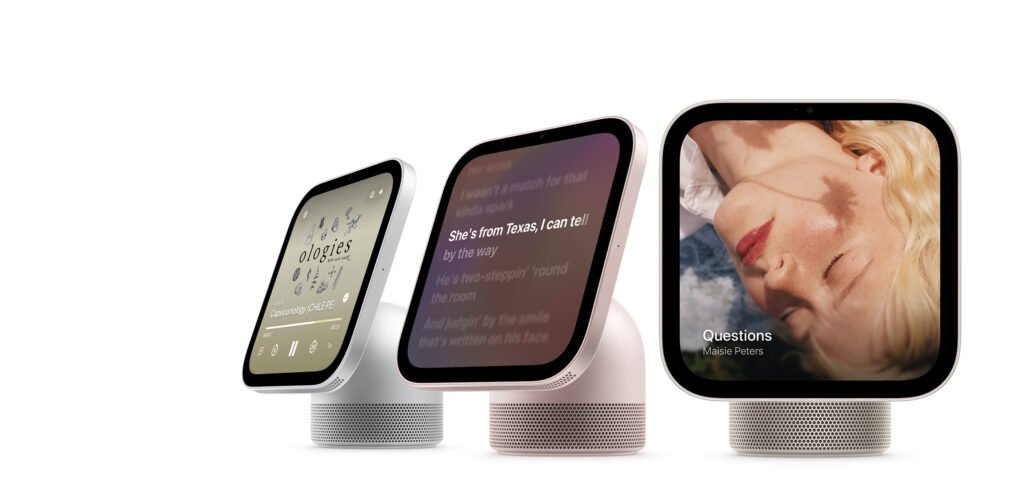
HomeView also functions as a communication and entertainment device. It supports FaceTime video calls, music and podcast playback, photographs, messages, reminders, and calendar information. Siri AI provides a voice-controlled way to access these functions, ask questions, and interact with compatible services.
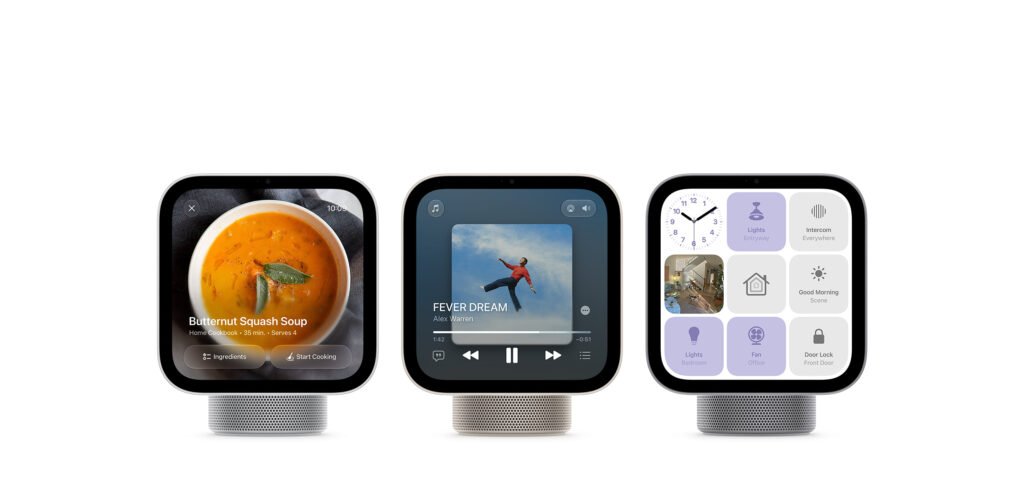
Another important feature is its multi-user experience. HomeView can recognise up to six people and personalise supported information for each recognised household member. This makes it more suitable for shared family spaces than a personal tablet that is configured around a single user.
Apple HomeView Design and Build Quality
Apple HomeView follows the company’s minimalist hardware design philosophy. Rather than looking like a traditional tablet placed on a stand, the device is designed as a dedicated home appliance that combines a display, audio hardware, a camera, and smart home controls.
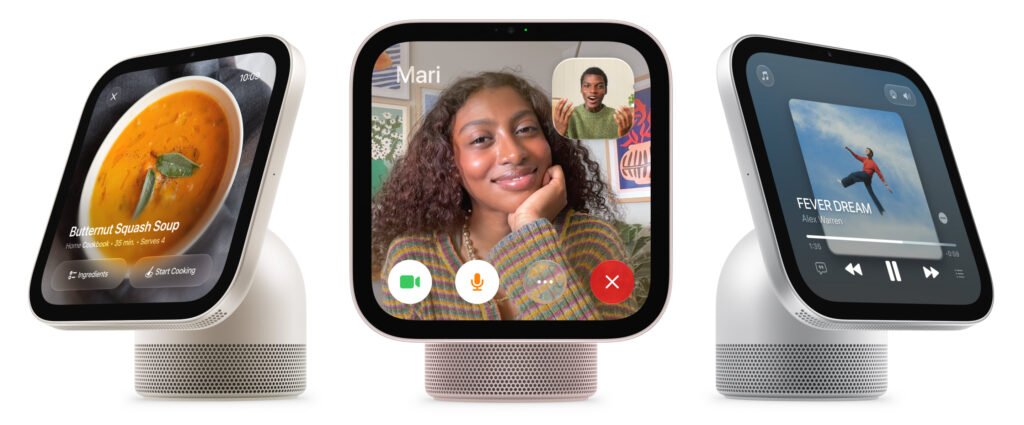
The tabletop version features a display connected to a domed aluminium base through a stainless-steel hinge. The hinge allows users to adjust the viewing angle, helping them position the screen comfortably on a kitchen counter, bedside table, desk, or living room shelf.
The integrated base also houses speakers, creating a more unified appearance than a separate tablet and external speaker arrangement. This design allows HomeView to function as both a visual smart home controller and a speaker for music, podcasts, and voice interactions.
Apple offers four colours for the tabletop model: Silver, Starlight, Rose Pink, and Space Gray. These options provide buyers with a choice between neutral finishes and a more colourful appearance.
Wall-Mounted Apple HomeView
Apple has also introduced a wall-mounted version of HomeView. It is intended for locations where a permanent smart home control panel would be more convenient than a tabletop device.
Possible installation locations include hallways, entrances, kitchens, and other frequently used areas. A wall-mounted display can make it easier to check the status of lights, inspect compatible security camera feeds, and control accessories while moving around the house.
The wall-mounted version is offered in Silver and Space Gray. Apple says it can be attached using compatible mounting options from Schneider Home, with self-installation and professional installation options depending on the mounting solution.
The tabletop and wall-mounted models share the same general display and feature set, but their physical installation requirements differ. Buyers should check the mounting hardware and power arrangements before choosing a wall-mounted configuration.
Apple HomeView Display Specifications
One of the defining features of Apple HomeView is its 7-inch Liquid Retina display. The screen provides a visual interface for home controls, widgets, personal information, photographs, video calls, and entertainment.
| Display feature | Specification |
|---|---|
| Display type | Liquid Retina, LED-backlit IPS Multi-Touch |
| Advertised size | 7 inches |
| Resolution | 1088 × 1088 pixels |
| Pixel density | 220 pixels per inch |
| Maximum brightness | 500 nits |
| Minimum brightness | 0.3 nits |
| Display technology | True Tone |
| Touch support | Multi-Touch |
The square display is particularly suitable for a smart home hub because it can accommodate control panels, clocks, photographs, and widgets without requiring a conventional widescreen format.
True Tone adjusts the display’s colour characteristics to suit the surrounding lighting conditions. Automatic brightness adjustment allows the screen to remain visible during the day while reducing its brightness at night. The exceptionally low minimum brightness is useful for bedside placement, where a bright display could otherwise disturb a dark room.
Apple also describes an interface that responds to the user’s proximity. Information can be presented in a simpler, more readable form from a distance, with additional details becoming available when a person approaches the screen.
Apple HomeView Processor and Performance
Apple HomeView is powered by Apple’s A18 chip, the same processor family used in the iPhone 16 generation. Its inclusion provides the processing capability required for a responsive touchscreen interface, multimedia playback, voice interactions, and supported Apple Intelligence features.
A dedicated processor is important for a smart home display because the device must remain responsive while handling several tasks, including displaying home controls, processing voice commands, managing connected accessories, and supporting video calls.
The A18 also provides the foundation for Siri AI features advertised for HomeView. However, the presence of the processor does not mean every Apple Intelligence feature available on an iPhone will necessarily be available on the smart display. Feature availability depends on Apple’s software implementation, supported applications, language availability, and compatible devices.
Apple has not positioned HomeView as a replacement for an iPad or Mac. Instead, the device is designed for frequently used household functions that benefit from being available immediately in a shared location.
Siri AI and Apple Intelligence
Siri AI is central to the Apple HomeView experience. Apple has introduced the device as part of a broader effort to make its smart home ecosystem more intelligent and easier to control through natural conversation.
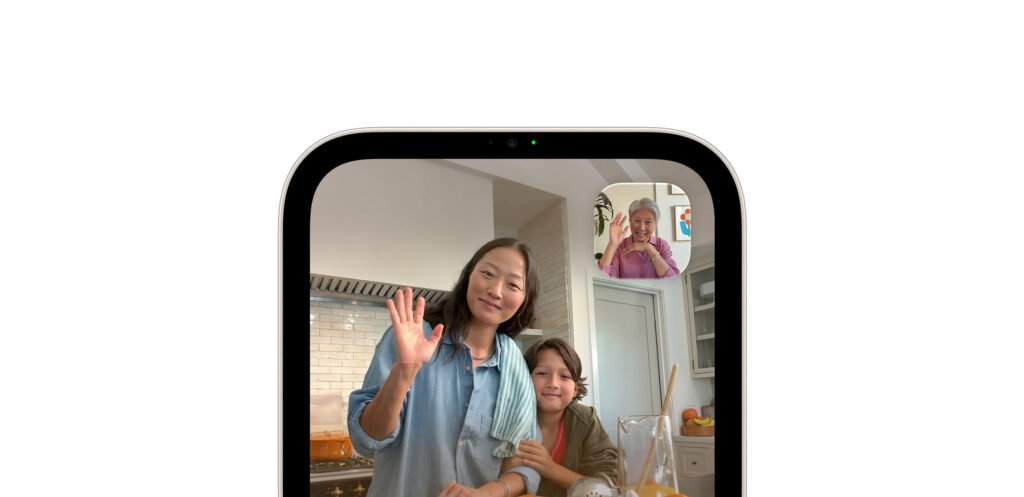
Instead of relying exclusively on touchscreen controls, users can speak to Siri to ask questions, request information, play music, or manage compatible accessories. Voice control is particularly useful when someone’s hands are occupied with cooking, cleaning, or other household tasks.
Natural Voice Interactions
HomeView is designed to support more conversational interactions than a simple smart speaker command interface. Users can ask general questions and interact with Siri to access information or supported functions.
For example, a household member might ask for the weather before leaving home, request a music playlist while preparing dinner, or ask Siri to control compatible lights. The exact actions available depend on the supported features, accessories, and software configuration.
Personalised Assistance
When paired with a compatible Apple Intelligence-enabled iPhone or iPad, Siri can use supported personal context to provide more relevant responses. This may include information from applications such as Calendar and Messages, subject to Apple’s requirements and the user’s configuration.
This integration could make HomeView useful for checking appointments, reviewing reminders, and accessing everyday information without picking up a phone.
However, buyers should note that Apple lists English as the initial language for the advertised Siri AI experience. Users who prefer other languages should check Apple’s current language and regional support information before purchasing.
Smart Home Controls and Apple Home Integration
Smart home management is one of the main reasons to consider Apple HomeView. It provides a dedicated interface for controlling compatible accessories and checking the status of devices connected to Apple Home.
Depending on the accessories installed in a home, users can manage lighting, adjust compatible thermostats, operate supported locks, and access camera feeds. Having these controls on a permanently available display can be more convenient than searching for a smartphone or navigating through several applications.
Lighting and Climate Control
HomeView can serve as a central control point for compatible smart lights and thermostats. Users can adjust lighting settings, manage supported temperature controls, and activate configured scenes through the touchscreen or Siri.
For example, a household can configure a morning scene that turns on selected lights and adjusts compatible devices. An evening scene could switch off unnecessary lighting or prepare connected accessories for bedtime.
Security Cameras and Door Locks
Compatible smart cameras and door locks can make HomeView particularly useful near a home’s entrance. Users can check supported camera feeds and access available lock controls from the display.
The device is intended to act as a control and monitoring interface for compatible accessories. It should not be confused with a standalone security camera system, and its capabilities depend on the accessories and services supported by Apple Home.
Matter and Thread Support
Apple positions HomeView within its connected home ecosystem, including support for Matter and Thread-related smart home functionality. Matter is a smart home interoperability standard designed to help compatible devices work across supported ecosystems, while Thread is a low-power networking technology used by many smart home accessories.
These technologies can make it easier to build a smart home with compatible products from different manufacturers. Nevertheless, Matter support does not guarantee that every feature of every third-party device will work in Apple Home. Buyers should confirm compatibility before purchasing accessories.
Apple HomeView Camera and FaceTime
Apple HomeView includes a 12-megapixel front-facing camera with Center Stage technology. This camera is designed for FaceTime video calls and helps keep participants within the frame as they move around or as additional people join a conversation.
The feature is especially useful for a device intended to sit in a shared room. Family members can make video calls without holding a phone, and the screen can provide a more comfortable way to communicate with relatives, friends, and colleagues.
Because HomeView is designed for the home, its fixed position can make it convenient for calls during everyday activities. Someone preparing a meal, for example, can participate in a video conversation while remaining in the kitchen.
The camera also contributes to the device’s personalised household experience. Apple says HomeView can recognise up to six people and switch supported personal information according to the recognised user.
Users should still consider the placement of any camera-equipped device in their home. Households may prefer to position HomeView in shared spaces rather than private areas, depending on their privacy requirements.
Audio Quality and Entertainment Features
HomeView is more than a touchscreen for home automation. Its integrated speakers and microphones allow it to function as an entertainment device and a hands-free assistant.
Apple lists four beamforming microphones designed to pick up voices from different positions around a room. Beamforming helps the device focus on sound arriving from relevant directions, supporting voice interaction and clearer calls.
The integrated speakers support Spatial Audio, giving the device a more immersive sound presentation for compatible content. This makes HomeView suitable for background music, podcasts, and other everyday listening activities.
Apple Music and Podcasts
Users can access supported music and podcast experiences through Apple’s software ecosystem. Siri can help with music discovery and voice-controlled playback, while the touchscreen provides a visual way to browse available content.
HomeView can be particularly convenient in a kitchen or living room, where people may want music playing while carrying out other tasks. It also offers an alternative to using a television or carrying a phone from room to room.
Photos and Personal Information
HomeView supports photographs and other personal content, helping it function as a digital display when it is not being used for active smart home controls.
Its broader software experience includes applications such as Photos, Calendar, Messages, Notes, and Reminders. These applications can help turn the device into a shared household information centre, while personal information is presented according to supported user-recognition and account settings.
Apple HomeView Privacy and Security
Privacy is an important consideration for any connected home device, especially one equipped with a camera, microphones, personal information, and smart home controls.
Apple says HomeView is designed with privacy and security in mind. Its multi-user functionality is intended to keep household members’ personal information separate, while recognised users can access their supported messages, calendars, reminders, and other personal content.
Apple’s Home ecosystem also uses encryption protections for supported smart home information. Compatible accessories and services must still be configured correctly, and security capabilities vary by product and feature.
Separate Experiences for Household Members
HomeView can recognise up to six people and provide a personalised experience for each supported user. This is an important distinction between a shared home hub and a personal tablet.
Personalisation can help the device show the right calendar, reminders, or supported messages to the appropriate person. Apple also says guests and unrecognised users can interact with certain general functions, such as checking the weather, setting timers, playing music, and controlling compatible accessories, without accessing another person’s personal information.
What Buyers Should Consider
Before installing HomeView, households should review account permissions, camera placement, access to personal information, and the settings used for shared smart home accessories. It is also sensible to use strong account security and keep compatible devices updated.
Although Apple’s privacy approach is a major selling point, buyers should not assume that any connected device is completely free from security risks. Actual protection depends on the device, software updates, account configuration, and the services being used.
Apple HomeView Specifications at a Glance
| Feature | Apple HomeView specification |
|---|---|
| Product category | Smart home display and control hub |
| Announcement date | October 13, 2026 |
| Display | 7-inch Liquid Retina IPS Multi-Touch |
| Resolution | 1088 × 1088 pixels |
| Processor | Apple A18 |
| Front camera | 12MP with Center Stage |
| Microphones | Four beamforming microphones |
| Audio | Integrated speakers with Spatial Audio support |
| Voice assistant | Siri AI |
| Smart home platform | Apple Home, with supported Matter and Thread functionality |
| Personalisation | Recognition of up to six people |
| Tabletop colours | Silver, Starlight, Rose Pink, Space Gray |
| Wall-mounted colours | Silver, Space Gray |
| Configurations | Tabletop and wall-mounted |
| US starting price | $299 |
| US preorder date | October 13, 2026 |
| Announced shipping date | November 13, 2026 |
Apple HomeView Price and Availability
Apple has announced a starting price of $299 for HomeView in the United States. The tabletop and wall-mounted versions are both listed at this starting price on Apple’s product page. Optional mounting hardware, installation services, taxes, and other regional charges may affect the final cost.
United States
In the United States, Apple HomeView is listed at $299. Preorders opened on October 13, 2026, with shipping scheduled to begin on November 13, 2026, according to the launch announcement and product information.
Europe
European pricing depends on the country and local Apple Store. Apple’s UK product listing confirms HomeView, but the US dollar price should not be treated as the official price in euros or British pounds. Buyers should check their country’s Apple Store for the local price, taxes, preorder status, and delivery dates.
Asia
Availability and pricing across Asia may differ between markets. Apple product launches can have different release schedules, local prices, and supported features depending on the country. Buyers should confirm whether HomeView is available through their local Apple Store or an authorised retailer before placing an order.
Tanzania and Other Markets
For buyers in Tanzania and other markets where direct Apple Store sales may be limited, availability will depend on local retailers and importers. The US starting price of $299 provides a useful reference, but it is not a confirmed Tanzanian retail price.
Imported devices may cost more because of shipping, import duties, taxes, retailer margins, and currency exchange rates. Buyers should also confirm regional availability, supported Siri languages, power arrangements, warranty coverage, and compatibility with their existing smart home accessories.
Apple HomeView vs Amazon Echo Show and Google Nest Hub
Apple HomeView enters a category that already includes smart displays from Amazon and Google. These products combine voice assistants, visual information, entertainment, and connected home controls, but they differ in their software ecosystems and supported services.
| Category | Apple HomeView | Amazon Echo Show | Google Nest Hub |
|---|---|---|---|
| Primary ecosystem | Apple Home | Amazon Alexa | Google Home |
| Voice assistant | Siri AI | Alexa | Google Assistant features vary by model and market |
| Video calling | FaceTime | Supported calling services vary by model | Supported calling features vary by model |
| Smart home compatibility | Apple Home and supported accessories | Alexa-compatible devices | Google Home-compatible devices |
| Personalisation | Recognition of up to six people | Features vary by model and service | Features vary by model and service |
| Starting price reference | $299 US | Varies by model | Varies by model and availability |
The table highlights broad platform differences rather than claiming that every competing model has identical capabilities. Features and pricing for Amazon and Google devices vary by generation, country, and software version.
HomeView’s strongest advantage is its integration with Apple devices and services. Households already using iPhones, Apple accounts, FaceTime, and Apple Home-compatible accessories may find it more convenient than moving between separate platforms.
On the other hand, buyers who rely heavily on Alexa or Google Home may prefer a display that fits their existing ecosystem. Before switching, they should check whether their current accessories and preferred services are supported by Apple Home.
Who Should Buy Apple HomeView?
Apple HomeView is best suited to people who want a dedicated control panel for their connected home rather than a general-purpose tablet.
- Apple ecosystem users: People who already use an iPhone, FaceTime, Apple Music, and Apple Home may benefit most from the integration.
- Smart home enthusiasts: Homeowners with compatible lights, cameras, thermostats, and locks can use the screen as a central control point.
- Families: Multi-user recognition can make supported household information accessible to different members.
- People who make frequent video calls: The 12MP Center Stage camera and integrated audio make hands-free FaceTime calls a major use case.
- Music and podcast listeners: Integrated speakers and Siri voice control make HomeView useful for everyday listening.
- People who prefer a permanent display: A tabletop or wall-mounted hub can be more convenient than unlocking a smartphone for every small task.
However, HomeView may be less attractive to people who need a portable device, prefer Android-based smart home systems, or want a large library of third-party applications. Apple has designed the product around household functions and its own ecosystem rather than as a replacement for a full tablet.
Potential Limitations of Apple HomeView
Despite its feature set, Apple HomeView has several considerations that prospective buyers should evaluate.
Dependence on Apple’s Ecosystem
HomeView is designed to work most naturally with Apple accounts, compatible Apple devices, and the Apple Home platform. Although supported smart home standards can broaden accessory compatibility, not every third-party feature will necessarily be available.
Initial Language Support
Apple lists English as the initial language for its advertised Siri AI experience. This could limit the usefulness of some AI features for households that prefer other languages. Regional support should be checked before purchase.
Price
At $299, HomeView is a significant purchase for a device designed primarily for use in one location. Buyers should compare its convenience and integration benefits with the cost of using an existing tablet, a smart speaker, or a competing smart display.
Regional Availability
International availability, local pricing, and supported services may vary. Buyers outside Apple’s main launch markets should confirm the local release status and warranty arrangements rather than assuming the US launch date applies everywhere.
Not a Complete Replacement for a Tablet
HomeView is designed for smart home management, communication, and entertainment. It should not be purchased with the expectation that it will provide the same portability, application selection, and general-purpose productivity features as an iPad.
Frequently Asked Questions About Apple HomeView
What is Apple HomeView?
Apple HomeView is a smart home display that combines a touchscreen, Siri AI, FaceTime, entertainment features, and controls for compatible smart home accessories.
When was Apple HomeView announced?
Apple announced HomeView on October 13, 2026. The company listed November 13, 2026, as the start of shipping in its launch information.
How much does Apple HomeView cost?
Apple HomeView starts at $299 in the United States. Local pricing, taxes, installation charges, and availability may differ in other markets.
What screen does Apple HomeView have?
It features a 7-inch Liquid Retina IPS Multi-Touch display with a resolution of 1088 × 1088 pixels, True Tone, and brightness ranging from 0.3 to 500 nits.
Which processor powers Apple HomeView?
HomeView is powered by Apple’s A18 chip, which supports its interface, multimedia functions, and advertised Apple Intelligence features.
Does Apple HomeView support FaceTime?
Yes. It supports FaceTime video and audio calling. Its 12MP front camera includes Center Stage technology to help keep participants in the frame.
Can Apple HomeView control smart home devices?
Yes. It can control compatible Apple Home accessories, including supported lighting, thermostats, locks, and cameras. Compatibility depends on the accessory and the features supported by Apple Home.
Does Apple HomeView support multiple users?
Yes. Apple says it can recognise up to six people and personalise supported information for each recognised user.
Is Apple HomeView available in a wall-mounted version?
Yes. Apple offers both tabletop and wall-mounted configurations. The wall-mounted version is intended for locations such as hallways and entrances, with compatible mounting solutions available through Schneider Home.
Can Apple HomeView work without an iPhone?
Apple says guests and unrecognised users can access certain general functions without an Apple Account or iPhone. However, a compatible iPhone or iPad and an Apple Account are required to unlock the full personalised experience described by Apple.
Is Apple HomeView available in Tanzania?
Availability in Tanzania should be confirmed with local retailers or authorised sellers. The US price and launch schedule do not guarantee that the device will be available locally at the same time or at the same price.
Conclusion
Apple HomeView represents Apple’s latest effort to make smart home technology more accessible through a dedicated household display. Its 7-inch Liquid Retina screen, A18 processor, Siri AI, 12MP Center Stage camera, integrated speakers, and Apple Home controls combine several everyday functions in a single device.
The ability to personalise supported information for up to six people could make HomeView especially useful in family homes. Its tabletop and wall-mounted designs also give buyers flexibility when choosing where to install a shared smart home interface.
Nevertheless, its $299 US starting price, dependence on Apple’s ecosystem, initial English-language Siri AI availability, and uncertain regional pricing are important considerations. Its value will depend on how many compatible accessories a household owns and how frequently its members use the communication, entertainment, and home automation features.
For people already invested in Apple’s ecosystem, HomeView could become a convenient control centre for the connected home. For other buyers, comparing compatibility, local availability, and the cost of competing smart displays will help determine whether Apple’s new device is the right choice.
Sources and References